

I Tested Budget Laptops — These Are the Best Laptops Under ₹50,000 in India (2026)
Looking for the best laptop under ₹50,000 in India? You’re in the right place.
After comparing performance benchmarks, battery life, real-world usage, thermals, and value for money, we’ve selected the best laptops you can buy in this price range for students, office work, coding, light gaming, and everyday productivity.
This article contains affiliate links. We may earn a commission at no extra cost to you.
Table of Contents
The Best Laptops Under ₹50,000 at a Glance
🏆 Best Overall – Lenovo IdeaPad Slim 3 (Ryzen 5 5500U)
Balanced performance, great battery life, perfect for students and office users.
💼 Best for Office Work – HP 15s (Intel i5 12th Gen)
Reliable brand, smooth multitasking, ideal for professional work.
👨💻 Best for Coding – ASUS VivoBook 15 (Ryzen 5 5600H)
Powerful processor, great for programming and development.
🎮 Best for Light Gaming – Acer Aspire 5 (Ryzen 5 5500U)
Decent integrated graphics for casual gaming.
🎬 Best for Content Creation – MSI Modern 14
Strong build quality, color-accurate display for editing.
How We Selected These Laptops
We evaluated:
- Processor performance (multi-core & single-core)
- RAM & upgrade options
- SSD speed
- Display quality
- Battery endurance
- Thermal management
- Brand reliability
- Real customer reviews
- Price stability
We avoided outdated 10th Gen Intel models and low-power Celeron laptops.
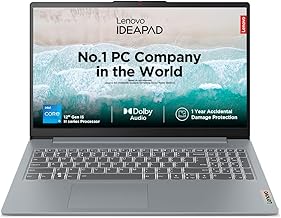
🏆 1. Lenovo IdeaPad Slim 3 – Best Overall Under ₹50,000
Specifications
- Processor: AMD Ryzen 5 5500U
- RAM: 16GB DDR4 (upgradeable)
- Storage: 512GB SSD
- Display: 15.6″ Full HD IPS
- Battery: Up to 7–8 hours
- Weight: 1.65 kg
Why It’s the Best Overall
This laptop offers the best balance of performance, battery, and price.
The Ryzen 5 5500U handles:
- Multitasking
- Coding
- Excel-heavy work
- Online classes
- Light editing
The 16GB RAM version makes it future-proof for at least 3–4 years.
Performance
In real-world usage:
- 20 Chrome tabs? Smooth.
- VS Code + browser? Smooth.
- Basic Photoshop? Manageable.
- GTA V low settings? Playable.
Thermals stay under control during extended usage.
Display & Build
IPS panel gives decent viewing angles.
Not the brightest screen, but acceptable for indoor work.
Plastic body, but solid hinge and minimal flex.
Battery Life
7–8 hours with moderate usage.
Perfect for college and office.
Buy It If
✔ You want best value overall
✔ You need multitasking performance
✔ You want future-proof RAM
Avoid If
❌ You need heavy gaming GPU
❌ You want premium metal build
Today’s Best Deals –
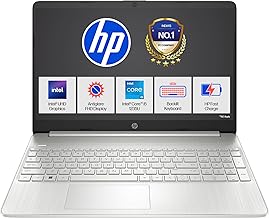
💼 2. HP 15s (Intel Core i5 12th Gen) – Best for Office Professionals
Specifications
- Processor: Intel Core i5 1235U
- RAM: 8GB (upgradeable)
- Storage: 512GB SSD
- Display: 15.6″ FHD
- Battery: 6–7 hours
Why It’s Ideal for Work
Intel 12th Gen architecture is very efficient for:
- MS Office
- Zoom meetings
- Excel sheets
- Business tools
- Tally / accounting software
HP’s service network in India is strong — that matters long term.
Real World Performance
Excellent single-core performance.
Fast boot times.
Smooth daily operations.
But 8GB RAM is minimum — upgrade to 16GB if possible.
Build & Design
Clean professional look.
Slim and lightweight.
Keyboard is comfortable for long typing sessions.
Battery Life Detail
The HP 15s with Intel Core i5-1235U delivers excellent battery life for everyday work
Typical Usage – web browsing, MS Office work, attending online classes, and video calls — the battery comfortably lasts 6–7 hours on a single charge.
Buy It If
✔ You need business reliability
✔ You want strong Intel performance
✔ You prefer HP brand
Avoid If
❌ You want gaming
❌ You need heavy video editing
Today’s Best Deals –
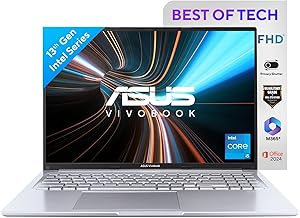
👨💻 3. ASUS VivoBook 15 – Best for Coding & Programming
Specifications
- Processor: Ryzen 5 5600H
- RAM: 8GB (expandable)
- Storage: 512GB SSD
- Display: FHD Anti-glare
- Battery: 6 hours
Why It’s Great for Developers
Ryzen 5 5600H is a powerful H-series chip.
Perfect for:
- Web development
- Android Studio
- Python projects
- Database work
- Virtual machines (light)
It performs better than U-series chips.
Performance
The ASUS VivoBook 15 (Ryzen 5 5600H) offers impressive performance for its price. The Ryzen 5 5600H is a high-performance H-series processor — more powerful and better sustained under load than U-series chips found in most budget laptops.
In real usage:
- Web browsing with 30+ tabs → smooth
- VS Code + Node server + browser → smooth
- Light Photoshop + Illustrator work → manageable
- Excel + Zoom + Word → no lag
For coding students or developers starting with Python, web dev, or data analysis, this laptop feels snappy and responsive — a noticeable step up compared to U-series processors.
Thermals
Gets warm under heavy load but manageable.
Display & Build
The 15.6-inch Full HD display with anti-glare coating is a strong point. It’s bright enough for indoor use and comfortable for long reading or coding sessions. Color accuracy is good for general productivity, video streaming, and even light editing work.
Build quality is solid — plastic body, slight flex on pressure points, but hinges are sturdy and the keyboard feels comfortable for long sessions. The overall design is modern and practical.
Battery Life
This Ryzen 5 laptop gives decent battery performance for a powerful chip.
In real day-to-day:
✔ 6–7 hours of light tasks
✔ 5–6 hours with coding + browser
✔ ~5 hours with video streaming
Buy It If
✔ You’re a CS student
✔ You use VS Code, IntelliJ, Android Studio
✔ You want performance under 50K
Avoid If
❌ You need long battery life
❌ You want ultra-slim design
Today’s Best Deals –
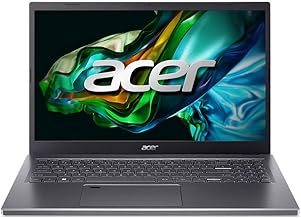
🎮 4. Acer Aspire 5 – Best for Light Gaming
Specs
- Ryzen 5 5500U
- 8GB RAM
- 512GB SSD
- Radeon integrated graphics
Why It’s the Best Overall
The Acer Aspire 5 (Ryzen 5 5500U) strikes the best balance between performance, price, reliability, and battery in the under ₹50,000 category. Its sustained multitasking ability, smooth everyday performance, and solid value make it a winner for most users — students, office workers, and light gamers alike.
In real scenarios, students reported:
- All-day browsing + Word + Zoom → snappy
- Netflix + YouTube streaming → smooth
- Casual games (Valorant/FIFA) → playable
Its integrated Radeon graphics are among the best you’ll find in budget laptops, allowing casual gaming without dedicated GPU.
Gaming Performance
Playable games:
- Valorant
- GTA V (low settings)
- FIFA
- CS2
Not for heavy AAA gaming.
But best gaming capability under 50K without dedicated GPU.
Display & Build
The Acer Aspire 5 includes a 15.6 inch Full HD IPS display, which delivers good color reproduction and wider viewing angles compared to cheap 1366×768 screens. This makes it great for movies and productivity.
The build feels solid for its price. The keyboard travel is comfortable, and the overall chassis doesn’t creak under normal use.
Battery Life
Battery life on Aspire 5 is a strong point for the segment:
✔ Normal mixed usage: ~7–8 hours
✔ Light tasks (docs + browsing): ~8 hours+
✔ Video streaming: ~6.5 hours
This is impressive for a budget laptop and enough for a full school or workday.
Buy It If
✔ You want casual gaming
✔ You want decent productivity
Avoid If
Don’t choose the Aspire 5 if:
❌ You need heavy AAA gaming performance (it’s integrated GPU only)
❌ You want premium metal body or ultra-thin form factor
❌ Battery life matters more than performance (choose HP 15s in that case)
Today’s Best Deals –

🎬 5. MSI Modern 14 – Best for Content Creators
Specifications
- Processor: Intel Core i5 (12th Gen) or Ryzen 5 variant
- RAM: 8–16 GB (expandable in some models)
- Storage: 512 GB SSD
- Display: 14″ Full HD IPS
- Weight: ~1.3 kg
- Battery: Typically ~6–7 hours
Why It Stands Out
Better display color reproduction.
Good for:
- Canva
- Basic Premiere Pro
- Photoshop
- YouTube thumbnails
Lightweight and stylish.
Performance
The MSI Modern 14 is a strong all-round performer in its price bracket. With either a 12th Gen Intel i5 or Ryzen 5 configuration, it handles:
- Microsoft Office suite → smooth
- Multiple Chrome tabs → smooth
- Light video editing → manageable
- Basic design apps (Canva, Photoshop) → comfortable
It’s slightly more performance-focused than many under ₹50k laptops, giving it versatility for creators who don’t want to spend much more.
Display & Build
The 14″ Full HD IPS screen is a highlight — sharper visuals and better color accuracy compared to most 15.6″ budget laptops. This makes the Modern 14 great for:
✔ Photo editing
✔ Watching Netflix/Prime Video
✔ Creating presentations
✔ Visual content work
The build quality feels sturdy and premium for its price. The chassis is lighter and more portable than larger 15.6″ alternatives, making it ideal for those who travel or carry it around college/work.
Battery Life
Battery performance is good for everyday use:
✔ ~6 hours with normal tasks
✔ ~5.5 hours with mixed work (browsing + streaming)
✔ ~4.5–5 hours with brightness high
Not the longest in the segment, but acceptable for portability and performance balance.v
Buy It If
✔ You want a portable laptop that’s easy to carry
✔ You do light content creation or photo/video work
✔ You prefer sharper display quality
✔ You want a balance of performance + portability
Avoid It If
❌ You only need heavy gaming performance
❌ Battery life is your top priority
❌ You prefer larger 15.6″ screens for typing comfort
Which Laptop Should You Actually Buy?
If you’re confused:
Students → Lenovo IdeaPad Slim 3
Office → HP 15s
Coding → ASUS VivoBook
Light Gaming → Acer Aspire 5
Design / Editing → MSI Modern
Today’s Best Deals –
Buying Guide: How to Choose a Laptop Under ₹50,000
1. Processor Matters Most
Minimum:
Ryzen 5 5500U
Intel i5 12th Gen
Avoid:
Celeron
Pentium
i3 10th Gen
2. RAM
Minimum 8GB.
Recommended 16GB.
3. Storage
Always choose SSD.
Never buy HDD laptop in 2026.
4. Display
Full HD minimum.
IPS preferred.
5. Upgrade Options
Check if RAM is expandable.
Ryzen vs Intel Under ₹50,000
Ryzen:
Better multi-core performance
Better value
Intel:
Better efficiency
Stronger single-core
For coding → Ryzen preferred
For office → Both fine
FAQs
Is 8GB RAM enough in 2026?
Yes for basic use. But 16GB is safer long term.
Can I do gaming under 50K?
Light gaming yes. Heavy AAA gaming no.
Is i3 good?
Only 12th Gen and above. Older i3 avoid.
Which laptop lasts longer?
Lenovo and HP models with upgradeable RAM.
Final Verdict
If you want the safest choice under ₹50,000 in India right now, the Lenovo IdeaPad Slim 3 with Ryzen 5 and 16GB RAM is the best overall combination of performance, battery life, and long-term value.
For professionals, HP 15s is reliable.
For developers, ASUS VivoBook offers raw power.
For casual gamers, Acer Aspire 5 delivers solid graphics.
You can also explore our complete list of the best laptops to buy in 2026 for premium and high-performance options.
Read more: Best Laptop Under ₹50,000 in India 2026